Tuesday, February 1, 2022

Prep for Google Certified Educator Level 2 Exam: Google Calendar


The Google Certified Educator Level 2 Exam has gone through some changes recently. In the past, it was 20 questions multiple choice and 11 performance tasks. The current iteration is 35 multiple choice questions based off of scenarios. Questions will ask you to choose between 1-5 correct answers. These questions require you to be familiar with the features and functionality of each Google Workspace for Education App. 

For Calendar, you need to be familiar with the following features and functionality.
-  Know how to set up office hours

- Know how to add people to calendar events

- Know how to set different notifications for event attendees


Click here to go through some Calendar Practice Scenarios on Quizizz Lessons. These scenarios are NOT the same as the test, but similar. If you understand the skills demonstrated in the videos and can answer my checking for understanding questions, you will be prepared for the Calendar portions of the Level 2 Exam.

If you have any questions and would like a follow up, contact me via Gmail or Chat at ajuarez@techcoachjuarez.com.  

Monday, January 31, 2022

Prep for Google Certified Educator Level 2 Exam: Google Chat Spaces


The Google Certified Educator Level 2 Exam has gone through some changes recently. In the past, it was 20 questions multiple choice and 11 performance tasks. The current iteration is 35 multiple choice questions based off of scenarios. Questions will ask you to choose between 1-5 correct answers. These questions require you to be familiar with the features and functionality of each Google Workspace for Education App. 

For Spaces, you need to be familiar with the following features and functionality.
-  Know how to share a file with members of the Space 
-  Know how to schedule a Calendar event from within the Space
-  Know how to assign tasks to members of the Space

Click here to go through some Spaces Practice Scenarios on Quizizz Lessons. These scenarios are NOT the same as the test, but similar. If you understand the skills demonstrated in the videos and can answer my checking for understanding questions, you will be prepared for the Spaces portions of the Level 2 Exam.

If you have any questions and would like a follow up, contact me via Gmail or Chat at ajuarez@techcoachjuarez.com.  

Friday, January 28, 2022

Prep for Google Certified Educator Level 2 Exam: Google Maps Streetview


The Google Certified Educator Level 2 Exam has gone through some changes recently. In the past, it was 20 questions multiple choice and 11 performance tasks. The current iteration is 35 multiple choice questions based off of scenarios. Questions will ask you to choose between 1-5 correct answers. These questions require you to be familiar with the features and functionality of each Google Workspace for Education App. 

For Streetview, you need to be familiar with the following features and functionality.
- Know how to use Streetview to identify street level features of a city, place or landmark

Click here to go through some Streetview Practice Scenarios on Quizizz Lessons. These scenarios are NOT the same as the test, but similar. If you understand the skills demonstrated in the videos and can answer my checking for understanding questions, you will be prepared for the Streetview portions of the Level 2 Exam.

If you have any questions and would like a follow up, contact me via Gmail or Chat at ajuarez@techcoachjuarez.com.  

Wednesday, January 26, 2022

Prep for Google Certified Educator Level 2 Exam: Google Slides


The Google Certified Educator Level 2 Exam has gone through some changes recently. In the past, it was 20 questions multiple choice and 11 performance tasks. The current iteration is 35 multiple choice questions based off of scenarios. Questions will ask you to choose between 1-5 correct answers. These questions require you to be familiar with the features and functionality of each Google Workspace for Education App. 

For Slides, you need to be familiar with the following features and functionality.
- Know how to use Slides to build a Create your own adventure story
- Know how to publish Slides to the web
- Know how add drop shadow to shapes and pictures
- Know how to change and edit theme

Click here to go through some Slides Practice Scenarios on Quizizz Lessons. These scenarios are NOT the same as the test, but similar. If you understand the skills demonstrated in the videos and can answer my checking for understanding questions, you will be prepared for the Slides portions of the Level 2 Exam.

If you have any questions and would like a follow up, contact me via Gmail or Chat at ajuarez@techcoachjuarez.com.  

Tuesday, January 25, 2022

Support English Learners and Quickly Translate PDF Files with Google Docs

Using PDF files and trying to support English learners can be tricky. Because PDFs are meant to limit editing, translating the text to the home language of English learners is difficult. There are paid services for this or you could recruit a translator, but who wants to spend money or wait for translation? For a long time, you have been able to open PDF files as Google Docs and the text became editable. But, in the past, the converted text was often jumbled and many stylistic mistakes were made. 

Recently, this function has greatly improved to where very little of the converted text is altered. With this, you can quickly translate the document from the Google Docs Tool tab. From there, you can download a version of your document in PDF format. Follow the steps below to learn how.

Step 1: Open a PDF in Google Drive.


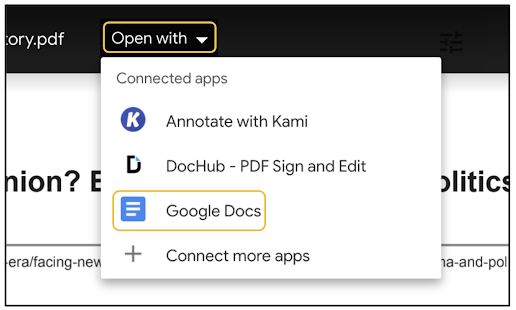
Step 2: Hover your cursor over the document. When the Open with option appears at the top middle, click it and select Google Docs.


Step 3: After the document opens in Docs, scroll through, check for any grammar or formatting errors that may have occurred during conversion and fix them. From there, click the Tools tab at the top. In the dropdown that appears, click Translate document.


Step 5: In the pop up that appears, title the new file and choose your language.


Step 6: After choosing your language, click Translate. A new file will be generated and saved in your Google Drive.


Step 7: The new file will automatically open in a new tab. It will be in the language you selected. Click the Tools tab and hover your cursor over Spelling and grammar. Click Spelling and grammar check. This will show all the mistakes lost in translation.


Step 8: In the pop up that appears, you'll see each mistake. You can ignore or accept each. Since I am not well versed in any language other than English, I generally trust Google's suggestions for spelling and grammar. Google Translate is much better than it used to be and it's a safe bet your translated version will be understandable by those who need to read it. I will say it isn't 100 percent accurate all the time, but good enough to get by until you can get someone to verify it. At the very least, you're providing access to content to those who need it.


Here is what the translated version of my original looks like.


Step 9: To get the translated version in a PDF format, click the File tab, hover your cursor over Download and select PDF. From there, a PDF file will be downloaded to your computer. From there you can upload to Drive if you want.


If you have any questions and would like a follow up, contact me via Gmail or Chat at ajuarez@techcoachjuarez.com.

My book, The Complete EdTech Coach: An Organic Approach to Digital Learning, co-authored with my wife Katherine Goyette is now available on Amazon. Click here to purchase. It is published by Dave Burgess Publishing. Be sure to follow the hashtag #OrganicEdTech and #CVTechTalk for updates.



Prep for Google Certified Educator Level 2 Exam: Google Sheets

The Google Certified Educator Level 2 Exam has gone through some changes recently. In the past, it was 20 questions multiple choice and 11 performance tasks. The current iteration is 35 multiple choice questions based off of scenarios. Questions will ask you to choose between 1-5 correct answers. These questions require you to be familiar with the features and functionality of each Google Workspace for Education App. 

For Sheets, you need to be familiar with the following features and functionality.
- How to use Sheets to create a print friendly calendar
- How to filter or hide unwanted data
- How to create charts
- Rules for conditional formatting
- How to enter a dropdown list

Click here to go through some Sheets Practice Scenarios on Quizizz Lessons. These scenarios are NOT the same as the test, but similar. If you understand the skills demonstrated in the videos and can answer my checking for understanding questions, you will be prepared for the Sheets portions of the Level 2 Exam.

If you have any questions and would like a follow up, contact me via Gmail or Chat at ajuarez@techcoachjuarez.com.  

Monday, January 24, 2022

Prep for Google Certified Educator Level 2 Exam: Google Scholar

The Google Certified Educator Level 2 Exam has gone through some changes recently. In the past, it was 20 questions multiple choice and 11 performance tasks. The current iteration is 35 multiple choice questions based off of scenarios. Questions will ask you to choose between 1-5 correct answers. These questions require you to be familiar with the features and functionality of each Google Workspace for Education App. 

For Scholar, you need to be familiar with the following features and functionality.
- Know how to save links to My Library
- Use Cite Tool for different citation styles
- Filter search results by date
- Know how to find similar articles via Related Articles function
- Know the difference in quality of search results as opposed to a traditional Google Search

Click here to go through some Scholar Practice Scenarios on Quizizz Lessons. These scenarios are NOT the same as the test, but similar. If you understand the skills demonstrated in the videos and can answer my checking for understanding questions, you will be prepared for the Scholar portions of the Level 2 Exam.

If you have any questions and would like a follow up, contact me via Gmail or Chat at ajuarez@techcoachjuarez.com.  

Sunday, January 23, 2022

Prep for Google Certified Educator Level 2 Exam: Google Photos


The Google Certified Educator Level 2 Exam has gone through some changes recently. In the past, it was 20 questions multiple choice and 11 performance tasks. The current iteration is 35 multiple choice questions based off of scenarios. Questions will ask you to choose between 1-5 correct answers. These questions require you to be familiar with the features and functionality of each Google Workspace for Education App. 

For Photos, you need to be familiar with the following features and functionality.
- Know how to upload images to Google Photos
- Know how to share individual images
- Know how to create albums and shared albums
- Know how to share links to images and albums

Click here to go through some Photos Practice Scenarios on Quizizz Lessons. These scenarios are NOT the same as the test, but similar. If you understand the skills demonstrated in the videos and can answer my checking for understanding questions, you will be prepared for the Photos portions of the Level 2 Exam.

If you have any questions and would like a follow up, contact me via Gmail or Chat at ajuarez@techcoachjuarez.com. 

Friday, January 21, 2022

Prep for Google Certified Educator Level 2 Exam: Google Meet


The Google Certified Educator Level 2 Exam has gone through some changes recently. In the past, it was 20 questions multiple choice and 11 performance tasks. The current iteration is 35 multiple choice questions based off of scenarios. Questions will ask you to choose between 1-5 correct answers. These questions require you to be familiar with the features and functionality of each Google Workspace for Education App. 

For Meet, you need to be familiar with the following features and functionality.
- Know what a Mystery Video Call is and how to use Meet to facilitate
- Know how to use Meet to bring in guest speakers to your class

Click here to go through some Meet Practice Scenarios on Quizizz Lessons. These scenarios are NOT the same as the test, but similar. If you understand the skills demonstrated in the videos and can answer my checking for understanding questions, you will be prepared for the Meet portions of the Level 2 Exam.

If you have any questions and would like a follow up, contact me via Gmail or Chat at ajuarez@techcoachjuarez.com. 

Thursday, January 20, 2022

Prep for Google Certified Educator Level 2 Exam: Google Keep

The Google Certified Educator Level 2 Exam has gone through some changes recently. In the past, it was 20 questions multiple choice and 11 performance tasks. The current iteration is 35 multiple choice questions based off of scenarios. Questions will ask you to choose between 1-5 correct answers. These questions require you to be familiar with the features and functionality of each Google Workspace for Education App. 

For Keep, you need to be familiar with the following features and functionality.
- Know how to archive a note and what it means to archive a note
- Be familiar with the process of adding a note to a label, color coding and pinning
- Know how to set both time-based and location-based reminders
- Know how to do a drawing note and how to add an image to a note

Click here to go through some Keep Practice Scenarios on Quizizz Lessons. These scenarios are NOT the same as the test, but similar. If you understand the skills demonstrated in the videos and can answer my checking for understanding questions, you will be prepared for the Keep portions of the Level 2 Exam.

If you have any questions and would like a follow up, contact me via Gmail or Chat at ajuarez@techcoachjuarez.com. 

Wednesday, January 19, 2022

Prep for Google Certified Educator Level 2 Exam: Jamboard


The Google Certified Educator Level 2 Exam has gone through some changes recently. In the past, it was 20 questions multiple choice and 11 performance tasks. The current iteration is 35 multiple choice questions based off of scenarios. Questions will ask you to choose between 1-5 correct answers. These questions require you to be familiar with the features and functionality of each Google Workspace for Education App. 

For Jamboard, you need to be familiar with the following features and functionality.
- Know how to add frames
- Add sticky notes to a frame and change the colors
- Know how to use the different annotation tools such as marker, brush and eraser

Click here to go through some Jamboard Practice Scenarios on Quizizz Lessons. These scenarios are NOT the same as the test, but similar. If you understand the skills demonstrated in the videos and can answer my checking for understanding questions, you will be prepared for the Jamboard portions of the Level 2 Exam.

If you have any questions and would like a follow up, contact me via Gmail or Chat at ajuarez@techcoachjuarez.com. 

Tuesday, January 18, 2022

Prep for Google Certified Educator Level 2 Exam: Google Groups


The Google Certified Educator Level 2 Exam has gone through some changes recently. In the past, it was 20 questions multiple choice and 11 performance tasks. The current iteration is 35 multiple choice questions based off of scenarios. Questions will ask you to choose between 1-5 correct answers. These questions require you to be familiar with the features and functionality of each Google Workspace for Education App. 

For Groups, you need to be familiar with the following features and functionality.
- How Groups could be used to run a political campaign to facilitate easy communication
- How Groups could be used to manage requests as part of a helpline or club

Click here to go through some Groups Practice Scenarios on Quizizz Lessons. These scenarios are NOT the same as the test, but similar. If you understand the skills demonstrated in the videos and can answer my checking for understanding questions, you will be prepared for the Groups portions of the Level 2 Exam.

If you have any questions and would like a follow up, contact me via Gmail or Chat at ajuarez@techcoachjuarez.com. 

Friday, January 14, 2022

Prep for Google Certified Educator Level 2 Exam: Google Earth

The Google Certified Educator Level 2 Exam has gone through some changes recently. In the past, it was 20 questions multiple choice and 11 performance tasks. The current iteration is 35 multiple choice questions based off of scenarios. Questions will ask you to choose between 1-5 correct answers. These questions require you to be familiar with the features and functionality of each Google Workspace for Education App. 

For Earth, you need to be familiar with the following features and functionality.
- How to view satellite imagery of the planet
- How to explore a city in 3D
- See the details and compare terrain and elevation

Click here to go through some Earth Practice Scenarios on Quizizz Lessons. These scenarios are NOT the same as the test, but similar. If you understand the skills demonstrated in the videos and can answer my checking for understanding questions, you will be prepared for the Earth portions of the Level 2 Exam.

If you have any questions and would like a follow up, contact me via Gmail or Chat at ajuarez@techcoachjuarez.com. 

My book, The Complete EdTech Coach: An Organic Approach to Digital Learning, co-authored with my wife Katherine Goyette is now available on Amazon. Click here to purchase. It is published by Dave Burgess Publishing. Be sure to follow the hashtag #OrganicEdTech and #CVTechTalk for updates.